
View as PDF

COMPUTING AND DIGITAL LITERACY

File and Folder Organization

Difficulty level: Easy

Computing and Digital Literacy

This document was made by AI and there may be mistakes. If a question or answer looks wrong, use the Flag a mistake button to let Brett know so he can fix it.

Overview of the concept

This is how you keep your schoolwork, photos, and projects tidy so you can find any file in seconds. A folder for each subject, with files named clearly, beats a desktop full of unnamed downloads. The time you spend organising is paid back every time you need something in a hurry. It is the habit that stops a lost file from becoming a missed deadline.

Worked examples

Example 1

Sort these school files into folders:
essay.docx,
photo.jpg,
maths.docx,
song.mp3.

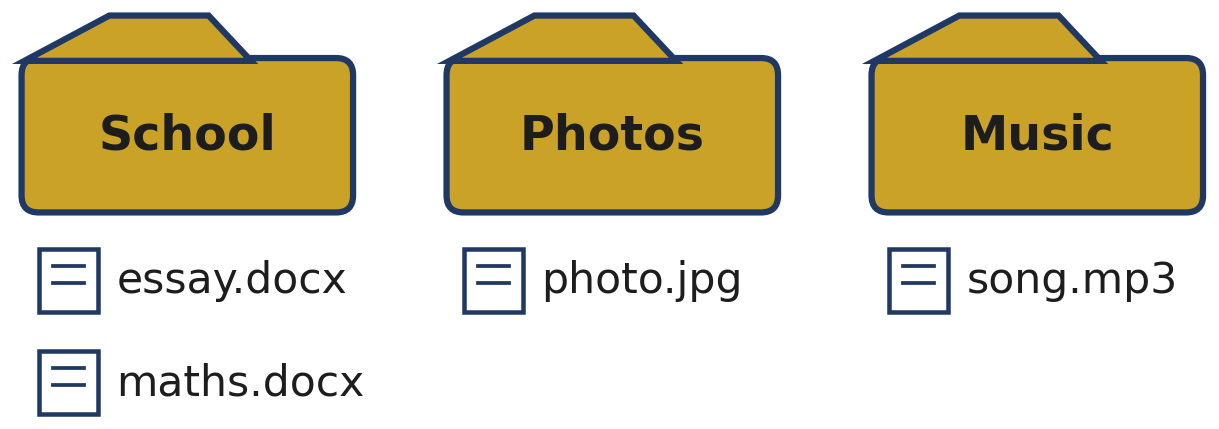
Diagram for Worked example 1: School, Photos and Music folders with essay.docx and maths.docx in School, photo.jpg in Photos, and song.mp3 in Music

Solution

This is a sort-into-folders question. The one rule to remember is to group files by what they are for, not by when you made them.

School work goes in School: essay.docx and maths.docx. The picture goes in Photos: photo.jpg. The song goes in Music: song.mp3.

Now every file has one home, and you can find it by thinking about what it is, not by remembering its exact name.

Example 2

Rename 'Document1', a science report about volcanoes from 2026, so you can find it later.

Solution

A good name answers three questions without opening the file: which subject, what it is, and which one it is.

Put the parts in the same order every time: subject, what it is, topic, then year, with hyphens between the words.

That gives Science-Report-Volcanoes-2026. A name like 'Document1' says nothing, and a name like 'final' stops meaning anything once you have two of them.

Practice questions

1

Sort these files into the folders School, Photos, and Music:
history.docx
cat.jpg
science.docx
piano.mp3
Which file goes in each folder?

2

Which name follows the pattern Subject-What-Topic-Year?

3

You have folders for each subject. Where does a science lab report go?

4

Rename this file so it is easy to find later: Document1, a science lab report about magnets from 2024

5

Why should you avoid naming a file 'final'?

6

Which file name is easier to find later: 'Document1' or 'History-Essay-Romans'?

7

You have folders by subject, and inside Science you now have 30 files. What is the next step to keep them findable?

8

Your desktop has fifty loose files. What is the first step to tidy it?

9

What is a folder used for?

10

What do you call a folder inside another folder?

ANSWER KEY

1. School: history.docx, science.docx. Photos: cat.jpg. Music: piano.mp3.

2. Maths-Worksheet-Fractions-2025

3. The Science folder

4. Science-Lab-Magnets-2024

5. Because you will soon have two files called final and neither name tells you which is newer; use version numbers instead

6. History-Essay-Romans

7. Make subfolders inside Science, for example by topic or by year

8. Sort the files into a few clear folders by subject or kind

9. Grouping related files together so they can be found again

10. A subfolder