
1
Cells B2:B4 hold 5, 10, 15. What does =SUM(B2:B4) show?
COMPUTING AND DIGITAL LITERACY
This document was made by AI and there may be mistakes. If a question or answer looks wrong, use the Flag a mistake button to let Brett know so he can fix it.
This is how a spreadsheet does the maths for you, so a budget or a price list updates itself the moment you change a number. Instead of recalculating everything by hand, you write the rule once and the spreadsheet repeats it for every row. That is how a small business keeps its prices right, how a family budget stays current, and how a coach can total a whole season of scores in seconds.
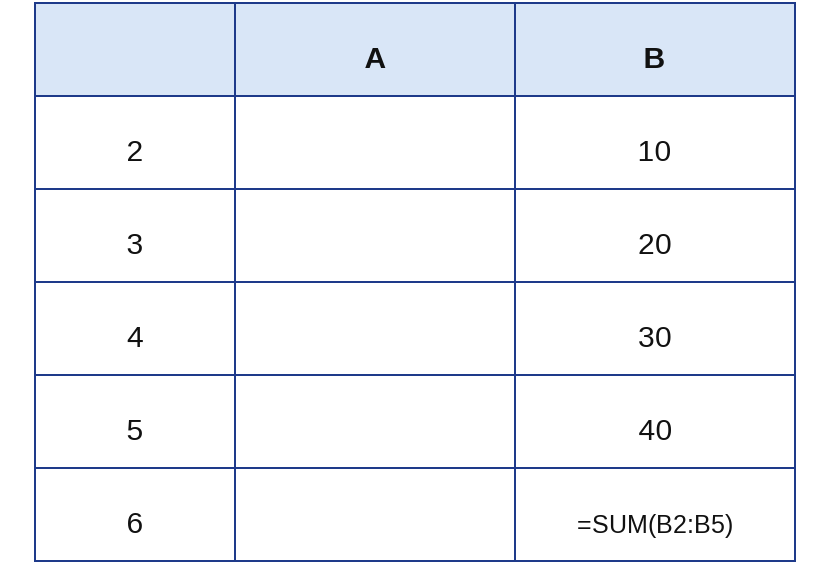
Cells B2 to B5 hold 10, 20, 30, 40. What is =SUM(B2:B5)?
Solution
B2 = 10, B3 = 20, B4 = 30, B5 = 40
In B6 type: =SUM(B2:B5)
Result shown: 100
Click the cell where the answer should go, here B6.
Type =SUM(B2:B5). The = tells the program a formula follows, and B2:B5 is the range.
Press Enter. The program adds 10 + 20 + 30 + 40 and shows 100.
Marks in B2 to B5 are 60, 70, 80, 90. What is =AVERAGE(B2:B5)?
Solution
Marks: 60, 70, 80, 90
In a cell type: =AVERAGE(B2:B5)
Result shown: 75
Type =AVERAGE(B2:B5) in the answer cell.
The program adds the four marks, 60 + 70 + 80 + 90 = 300
It divides by how many there are, 3004 = 75, and shows 75.
Cells B2:B4 hold 5, 10, 15. What does =SUM(B2:B4) show?
Cells C2:C4 hold 2, 4, 6. What does =SUM(C2:C3) show?
Write the formula that adds cells A1 to A10
Cells D2:D5 hold 1, 2, 3, 4. =SUM(D2:D5) shows 10. If D5 changes from 4 to 14, what does the formula show now?
What does =AVERAGE(B2:B4) show for 5, 10, 15?
Marks 50, 60, 70, 80 are in B2:B5. =AVERAGE(B2:B5) shows 65. What is the total of the four marks?
Numbers 4, 8, 12 are in A2:A4. How many numbers does =AVERAGE(A2:A4) divide by?
Numbers 10, 20, 30, 40 are in A2:A5. =AVERAGE(A2:A5) shows 25. If all four numbers doubled, what would the average be?
What character must every formula start with?
What does B2:B5 mean?
Your score: 0 / 10
1. 30
2. 6
3. =SUM(A1:A10)
4. 20
5. 10
6. 260
7. 3
8. 50
9. =
10. The range from cell B2 to cell B5